For businesses that sell on WhatsApp and Instagram
Your WhatsApp and Instagram, switched on
Every customer message answered in seconds, from your own prices, timings and policies. Orders, bookings and payment links handled right in the chat. Anything that touches money waits for your tap.
- No card to start
- Priced in rupees
- Official WhatsApp API
Riya Sharma
Instagram · Dance Booth
The busy part of your day, handled
Not a chatbot bolted onto an inbox. ChatOps answers, acts and keeps you in charge.
Inbox & CRM
Every conversation in one inbox
One inbox for WhatsApp, Instagram DMs and web chat, one thread per customer, with Instagram comments and Google reviews alongside. Phone numbers, emails and handles resolve to one contact, so the team sees the whole story and the AI never asks twice.
- Team inbox with assignment
- Assign conversations to people; status, tags and notes live on the contact.
- Lead scoring against your rubric
- Every conversation gets an intent and a hot, warm or cold score.
- 24-hour window awareness
- Switches to approved templates when the free-form window closes.
- Comments and Google reviews
- Brand-safe owner replies drafted for you to approve from your phone.
Also: Templates submitted to Meta in-app · Web chat widget · Consent and opt-out tracking · CSV import and export
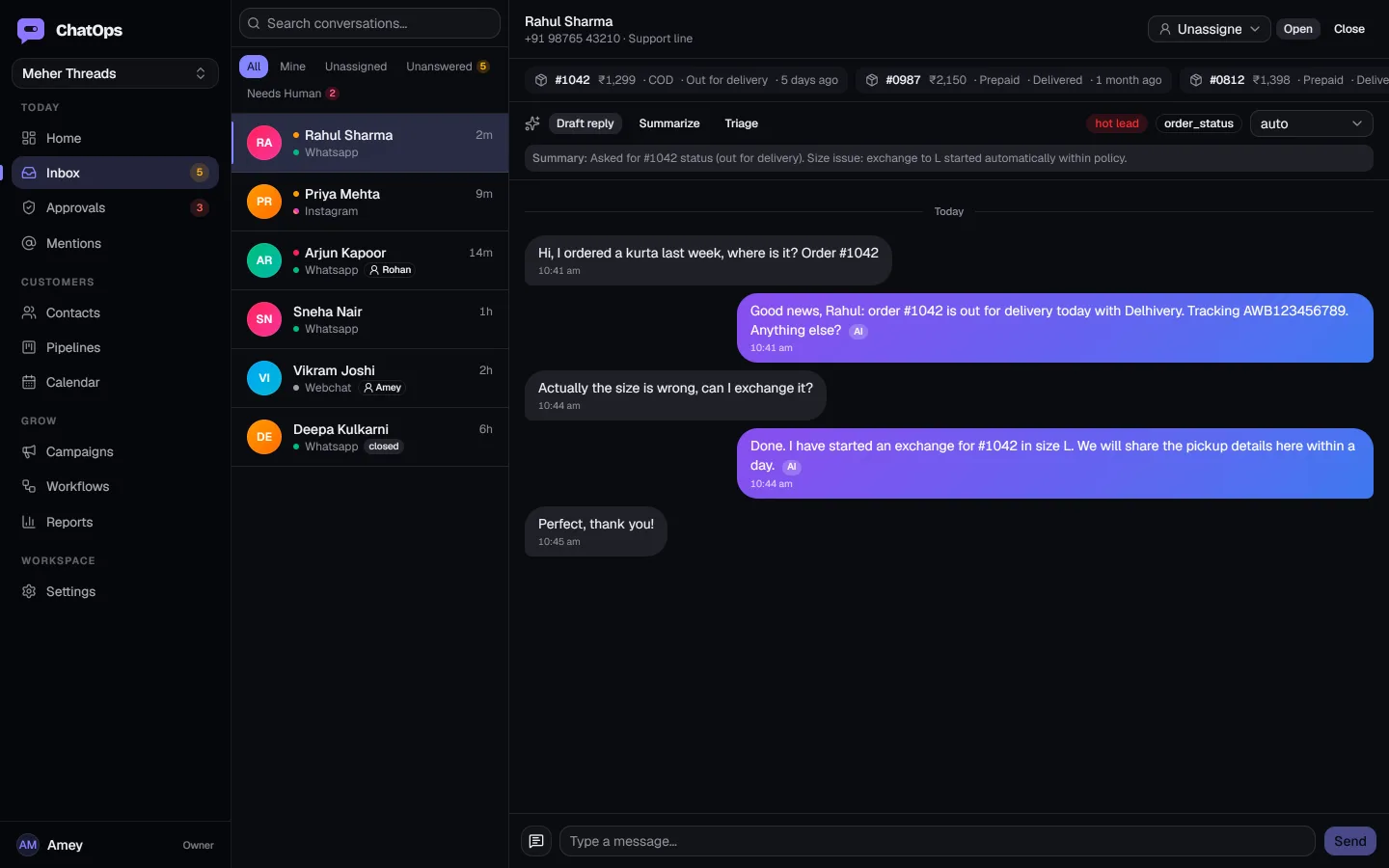
Commerce & operations
It sells and books, not just chats
The AI does not guess where an order is. It reads your store, your courier and your payment gateway, then acts within the limits you set: returns inside the window go through, refunds wait for you.
- Shopify sync
- Orders, customers, products and checkouts, in near real time.
- COD confirmation
- Confirm / Cancel before you ship, with expiry and follow-up.
- Payment links
- Razorpay links turn cash on delivery into prepaid with one tap.
- Bookings from real availability
- Classes, tables and site visits booked and confirmed.
Also: Shiprocket shipping updates · Abandoned checkout recovery · Address change requests · Inventory-aware answers
Arjun Mehta
WhatsApp · Meher Threads
Growth
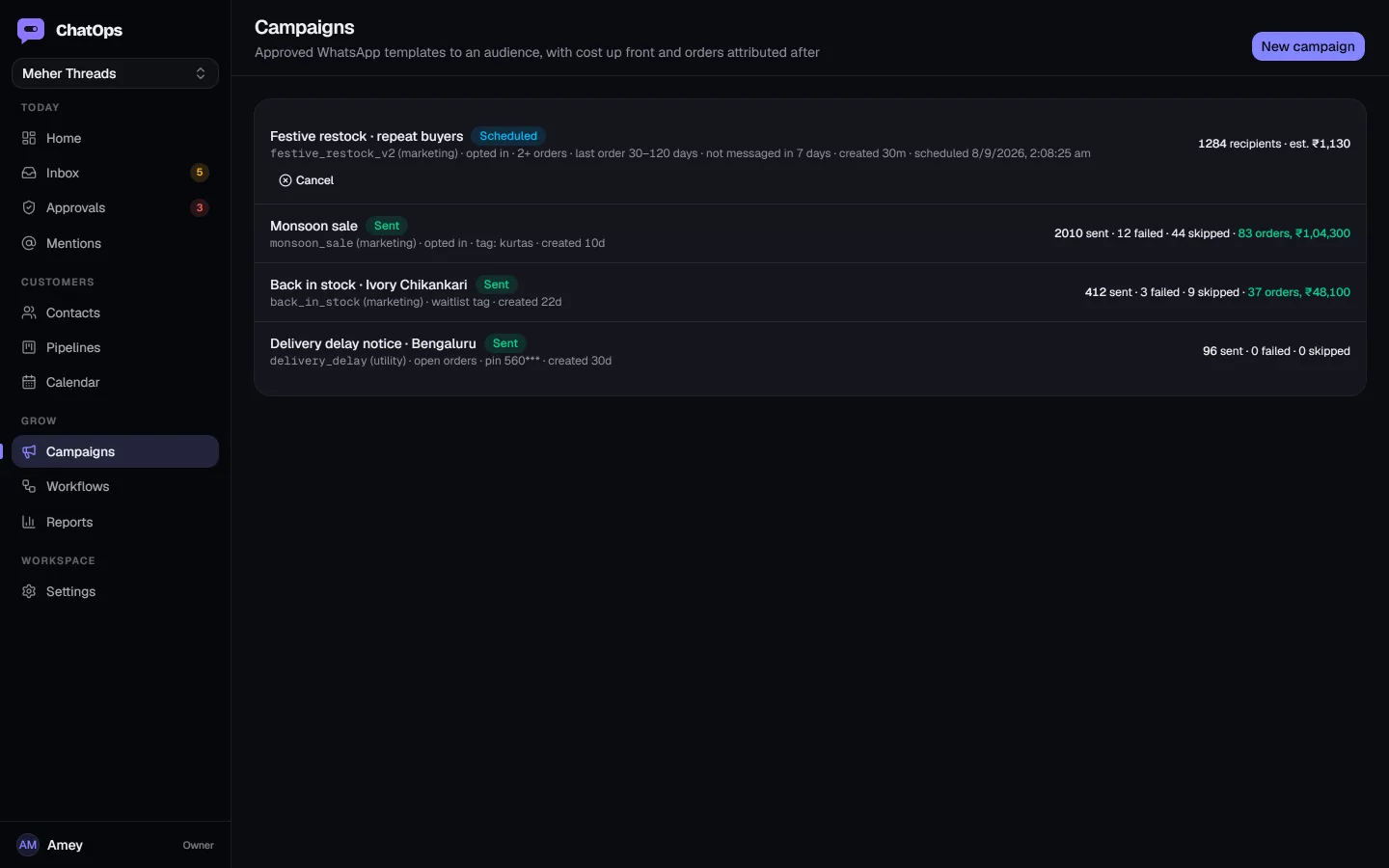
Campaigns and automations that pay for themselves
WhatsApp offers to customers who opted in, with the recipient count and Meta cost shown before you send and the orders attributed after. Workflows react to what happens next, with no code.
- Cost up front
- Audiences by tag or order history, priced before sending.
- Attribution you can trust
- Orders after a campaign are credited to it; the click-to-WhatsApp ad source is captured on every lead.
- Visual workflows
- Trigger on a hot lead or an abandoned cart; wait, branch, send, assign.
- Follow-ups that never slip
- A send that fails is flagged to you instead of quietly vanishing.
Also: Batched under Meta rate limits · Run history for every workflow · Daily summary email · Installable on your phone
You decide how much it does
Start with the AI off and hand it more as you trust it, one switch per conversation. Most businesses are live in an afternoon.
AI mode for this conversation
Off: you and your team reply, the inbox keeps everything together.
waiting for your team
Step 1 · Off
Connect your channels
Link your WhatsApp Business number and Instagram, add the chat widget to your website, and import your customers from a spreadsheet.
- Your number stays on your own WhatsApp Business account
- Every channel lands in one shared inbox
- The AI stays off until you're ready
Step 2 · Suggest
Teach it your business
Paste your prices, timings and policies, upload a brochure, or let it learn from the answers you've already given customers.
- Works in English, Hindi and Hinglish
- Only answers from what you taught it
- Tell it which topics always go to a person
Step 3 · Approve
Let it draft, you tap send
Each reply reaches your phone with Send, Edit and Skip. What you pick is what goes out, and every edit teaches it your voice.
- Approve in the app, on Telegram or from a notification
- Pick from three drafts if you like
- Payment links and refunds always wait for you
Step 4 · Autopilot
Let the simple ones go
Timings, prices, order status and bookings answered on their own, day and night. Sensitive topics and anything touching money still wait for you.
- Every reply is checked for risk first
- Health, legal, refunds and complaints are held
- Switch back to Approve for any conversation
Autopilot with a human on the brakes
Automation only earns trust when it is easy to see, easy to stop and impossible to overstep. These controls are on for every workspace from day one.
- Approvals before money moves
- Refunds, cancellations, discounts, payment links and booking tokens are proposed with the numbers and wait for a tap from you.
- Human-in-the-loop replies
- Send, Edit and Skip on Telegram, in the app or from a phone notification. What you choose is what goes out, and it teaches the agent your voice.
- Tenant isolation and encryption
- Row-level security on every table. Channel secrets and your model keys are encrypted at rest and never returned to the browser.
- Full audit trail
- Every agent run stores the tools it called, the passages it used and the model that answered. Every approval records who decided and when.
- Consent and opt-out respected
- Stop requests are honoured automatically, and campaigns only reach contacts who opted in.
- Budgets and rate limits
- Hourly AI budgets per workspace, plan allowances with a soft warning and a hard pause, and per-key limits on the API.
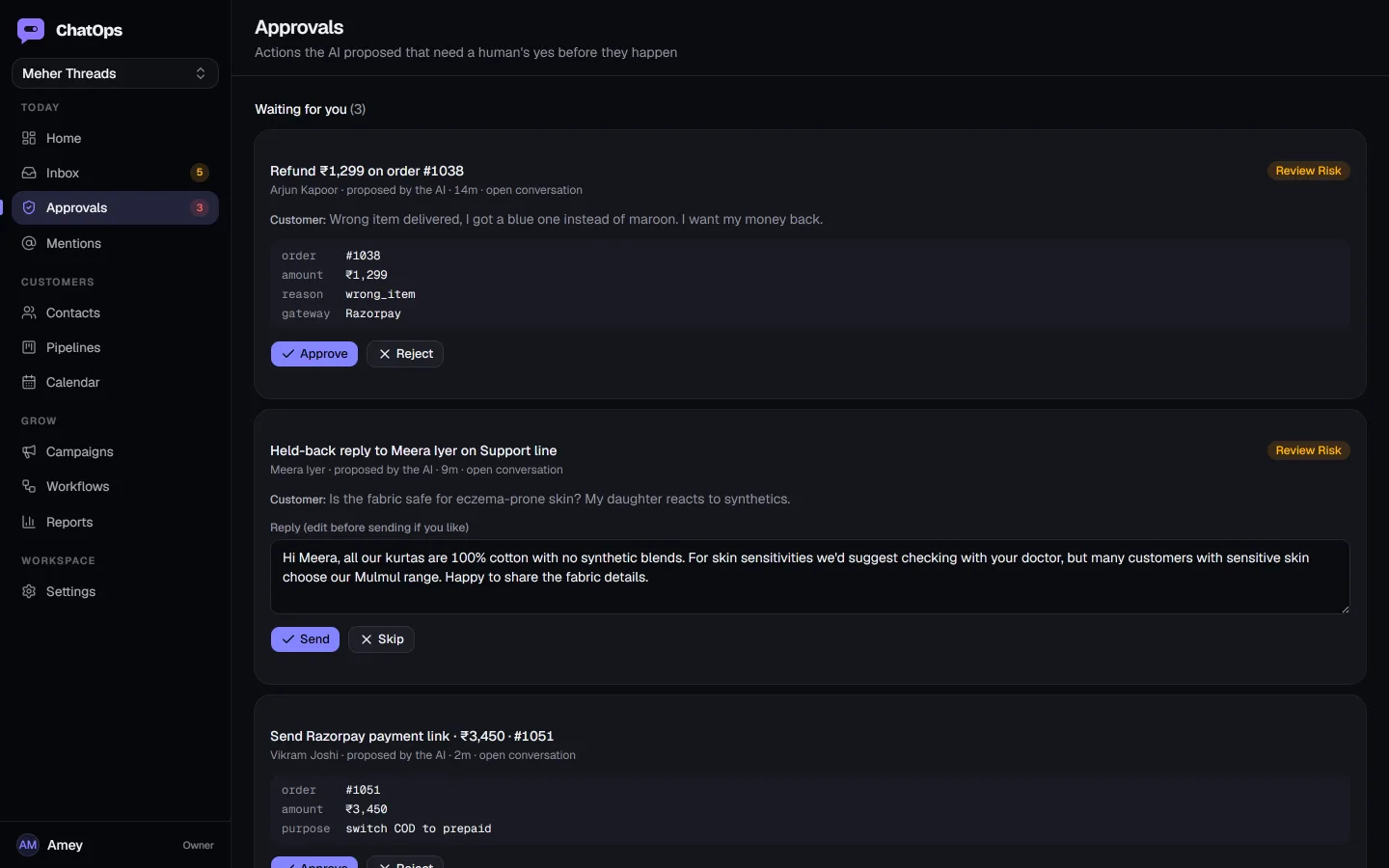
approvals · refund ₹1,299 and a held-back reply, waiting for a person
Your industry's flows, ready on day one
A pack installs the objects, tools, templates, lead-scoring rubric and workflows for a business type on top of the same core. Turn one on and the AI already knows what an order or a site visit is.
Ecommerce on Shopify
For D2C brands doing 300 to 5,000 orders a month.
Connects in five minutes with Shopify OAuth. Products, customers and orders sync through webhooks.
- COD confirmation with Confirm / Cancel buttons before you ship, with expiry and follow-up. Cuts returns to origin.
- Abandoned checkout recovery: timed nudges, a coupon on the second one, recovered revenue tracked.
- Shipped, out for delivery and delivered updates from Shopify and Shiprocket as approved templates.
- Order status, address changes, returns and refunds answered and actioned from live store data.
- Razorpay payment links to switch COD to prepaid; payment status flows back into the thread.
- Lead scoring tuned for purchase intent, and audiences built from order history for campaigns.
Clinics, salons, coaching and services run on the core bookings and knowledge features today.
A chatbot answers. ChatOps closes.
The difference shows up the moment a customer asks something that needs real data or a real decision.
| Capability | Menu chatbot | AI chat plugin | ChatOps |
|---|---|---|---|
| Answers | Scripted menus | Generic LLM replies | Grounded in your knowledge, cites what it used |
| Order questions | Not available | Guesses or deflects | Reads live Shopify, Shiprocket and Razorpay data |
| Takes action | Not available | Not available | Books, tags, starts returns, sends payment links |
| Money-shaped actions | Not available | Unrestricted or blocked | Tiered policy, approval required, audit trail |
| Human handoff | Fallback to menu | Manual takeover | Risk-based holds, Send / Edit / Skip on Telegram |
| Campaigns & attribution | Broadcast lists | Not available | Audiences from orders, cost up front, orders attributed |
| Workflows | Fixed flows | Not available | Event-triggered, waits, branches, AI steps, run history |
| Your model, your key | Not available | Vendor's model only | Built-in or bring your own provider |
Plugs into how you already work
Developers get a documented API and webhooks; agencies get client workspaces and branding.
- REST API with scoped keys
- Contacts, conversations, messages, orders, templates and lead intake. 120 requests a minute per key.
- Signed webhooks
- Every domain event, from message.received to cod.confirmed, with an HMAC signature, retried for up to 12 hours.
- Bring your own AI provider
- OpenAI, Anthropic, Gemini, Groq, OpenRouter or a self-hosted endpoint, per workspace.
- Agencies and white label
- Client workspaces from one login, with your logo and colours in the app your clients use.
- Lead intake
- Website forms, Facebook Lead Ads and property portals, all landing in the same inbox.
- Reporting and digests
- Response times, AI share of answers, COD confirmation rate, recovered carts, leads by source.
Things people ask before they start
Is this the official WhatsApp API?
Yes. ChatOps runs on the WhatsApp Business Platform through Meta or a business solution provider, with approved templates for anything outside the 24-hour window. No unofficial automation, ever.
Will the AI send something embarrassing?
Every inbound message is classified for risk before an automatic reply. Health, legal, refunds and press are always held for a human. Money-shaped actions always wait for approval. You can run it in suggest mode until you trust it, then approve mode, then autopilot for safe replies only.
Can I use my own AI model or key?
Yes. In Settings → AI pick OpenAI, Anthropic, Google Gemini, Groq, OpenRouter or a custom OpenAI-compatible endpoint such as Ollama, paste your key, test the connection and save. Your workspace then runs on your account and your quota. Leave it blank and the included model is used.
Does it reply to Google reviews?
Yes. Connect your Google Business Profile in Settings → Google reviews. New reviews are pulled in automatically and an owner reply is drafted in your voice: thankful and specific for praise, a single apology and an invitation to continue privately for complaints. Nothing is posted until you tap Send, in the app or on Telegram, and replies you post on Google yourself are picked up too.
Do I need a developer to set it up?
No. Connect a number, paste your policies into the knowledge base or upload a PDF, connect Shopify or import inventory, and turn on the flows you want. Developers get an API and webhooks when they want them.
What about my existing number and customers?
The number stays on your own WhatsApp Business Account. Import your existing customers from a spreadsheet, and export contacts and conversations to a spreadsheet from Settings whenever you like, or through the API.
How is usage charged?
Plans include monthly allowances for AI actions and messages. Past the allowance you get a warning; automatic work pauses at 120% and your team can always reply by hand. Meta's message fees are passed through at cost.
Is my data isolated from other customers?
Every table is protected by row-level security keyed to your workspace. Channel secrets and model keys are encrypted at rest. Agencies see only the client workspaces they manage.
Priced for India, paid monthly
Every plan includes the inbox, contacts, knowledge base and approvals, for WhatsApp, Instagram and web chat. Meta's per-message WhatsApp fees are passed through at cost and shown before every campaign.
Starter
- Shared inbox
- Contacts & pipelines
- Simple automations
- 500 AI actions
- Email support
- 2 seats · 1 WhatsApp number
Growth
Most chosen- One industry pack (store, food or real estate)
- AI agent with tools & approvals
- Knowledge base
- Workflows & campaigns
- 3,000 AI actions
- Email support
- 10 seats · 1 WhatsApp number
Scale
- Unlimited seats
- Multiple numbers & packs
- API access
- 15,000 AI actions
- Email support
- Unlimited seats · 3 WhatsApp numbers
14-day trial on every plan. Bring your own AI key on any plan. Compare every allowance and see how usage works
Your WhatsApp and Instagram, switched on.
Connect your channels, teach it your prices in an afternoon, and watch the first reply go out while you finish setup.